
Building a Zero-Dependency, In-Memory RAG for My Next.js Portfolio
When I recently integrated an AI chatbot into my personal portfolio, I was excited to see it working. But the excitement faded quickly when I tested it. If I asked, "What is Ullas's latest project?" or "Where is his blog post on Chrome extensions?", the bot would hallucinate a generic response. It was a cool feature, but it lacked the most important thing: context about me.

I needed a way to feed my actual portfolio data and blog posts into the AI. The industry-standard solution for this is Retrieval-Augmented Generation (RAG).
If you look at typical RAG tutorials today, the architecture usually looks like this: you set up a dedicated vector database (like Pinecone, Weaviate, or PgVector), connect it to your backend, and run complex retrieval chains. While this is fantastic for enterprise applications with gigabytes of data, it felt like massive overkill for a personal portfolio. I didn't want to manage an external database, deal with network latency, or worry about potential monthly costs.
I asked myself: Can I build a fully functional RAG pipeline entirely within my Next.js app, using just local files and some basic math?
It turns out, you can. Here is a deep dive into how I engineered a lightweight, zero-dependency RAG architecture.
The Concept: Simplifying RAG
At its core, RAG is just a highly specific search engine connected to an AI. Instead of giving the AI your entire database (which is too large and expensive), you find the 1 or 2 most relevant paragraphs to the user's question, and you hand only those paragraphs to the AI to help it answer.
To do this without a database, I split the work into two distinct phases:
- Offline Preparation: Preparing the data locally on my machine.
- Runtime Execution: Searching the data quickly on the live server.
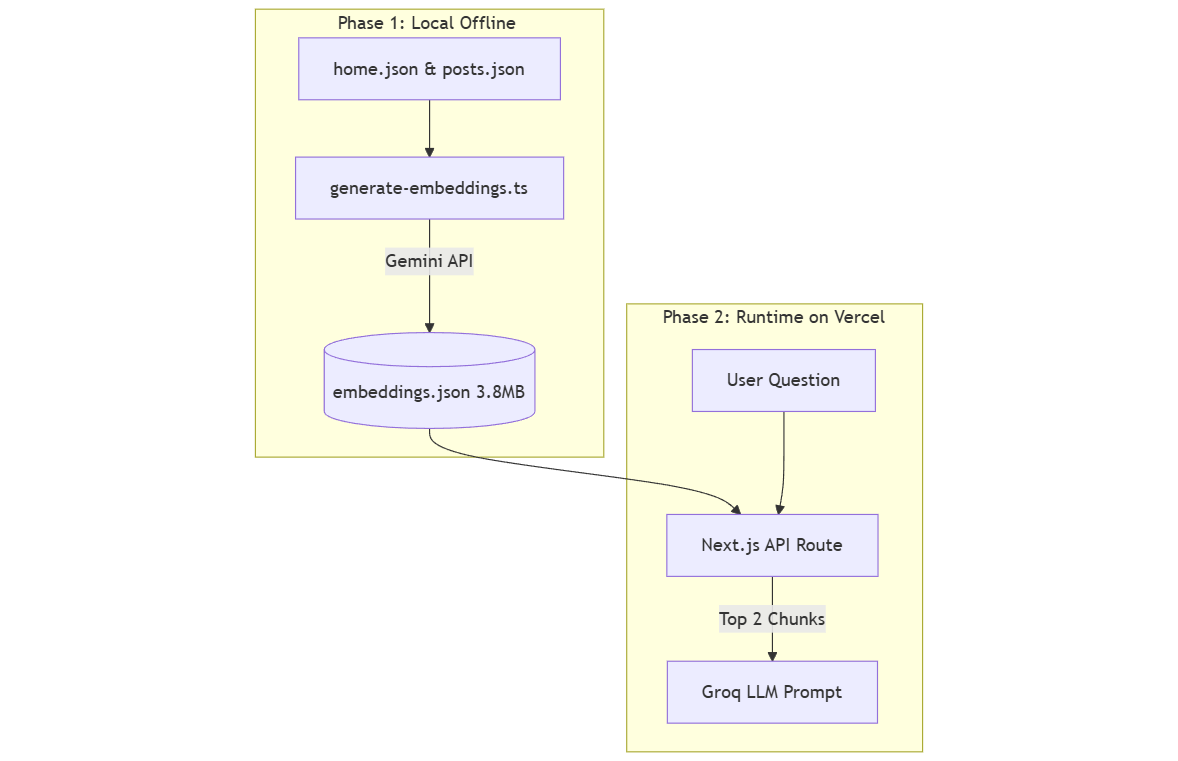
Phase 1: Preparing the Data Offline
Rather than generating embeddings dynamically on the server, I decided to pre-compute everything offline. I wrote a Node.js script (scripts/generate-embeddings.ts) that runs locally on my development machine.
1. Ingesting and Chunking
First, the script reads my local home.json (which contains my bio, skills, and projects) and fetches my live posts.json from my GitHub repository.
It then formats this data into bite-sized "chunks." For example, a single blog post's title, description, and tags are combined into one discrete text string.
2. Generating Vectors (Embeddings)
Next, I needed to convert these text chunks into "vectors"—arrays of floating-point numbers that represent the meaning of the text.
A quick tip for developers: Initially, I encountered persistent 404 Not Found errors using Google's text-embedding-004 model. After some debugging, I realized the old @google/generative-ai SDK was deprecated for this use case. Switching to the newer @google/genai package and using the gemini-embedding-001 model fixed it instantly.
import { GoogleGenAI } from "@google/genai";

const ai = new GoogleGenAI({ apiKey: process.env.GEMINI_API_KEY });
const response = await ai.models.embedContent({
  model: 'gemini-embedding-001',
  contents: chunk.text,
});
3. Saving to a Local JSON File
Instead of sending these generated vectors to a cloud database, the script simply saves them into a local file: data/embeddings.json.
This file contains the original text, the deep links (URLs), and the mathematical vector for every chunk. It ended up being roughly 3.8MB in size (around 190,000 lines). I just committed this file directly to my Git repository alongside my code.
Phase 2: The Runtime (How the Chat Works)
When I deploy my Next.js app to Vercel, that 3.8MB embeddings.json file goes with it. Because 3.8MB is quite small for a modern server, Vercel's Serverless Functions can easily hold it entirely in memory.
Here is exactly what happens when a user types a question into the chatbot:
1. Embedding the User's Question We take the user's short question and send only that sentence to the Gemini API. The API returns a single vector representing the user's intent.
2. In-Memory Math (Cosine Similarity)
Now, we need to find which chunk of my portfolio data matches the user's question. We do this using a mathematical formula called Cosine Similarity. The Vercel server iterates over the in-memory embeddings.json array and compares the user's vector against every chunk's vector.
Because Node.js is incredibly fast at array iterations, this entire search process takes just a few milliseconds.
3. Extracting the Top Results We sort the similarity scores and pick the top 2 highest-scoring chunks.

Phase 3: Prompt Injection (Talking to the LLM)
This is a crucial point to understand: We never send the 3.8MB JSON file to the main AI model. Sending that much data would exceed token limits and cost a fortune.
Instead, we take only the text from those top 2 matching chunks (which is just a few paragraphs) and inject it into the System Prompt of our primary LLM (I use Groq for its speed).
The prompt looks something like this: "You are Richard, Ullas's AI assistant. Use the following context to answer the user's question. Context: [Blog Title, Description, Link]."

The LLM reads that tiny bit of relevant context, formulates a natural response, and formats the deep link nicely for the user.
A Quick Warning on Next.js Deployments
While this architecture is simple, I did hit one major roadblock during deployment. On localhost, everything worked flawlessly. But when I deployed to Vercel, the bot reverted to hallucinating. It acted as if the data didn't exist.
The issue was how I was loading the JSON file. Initially, I used Node's fs module:
const embeddingsPath = path.join(process.cwd(), "data", "embeddings.json");
const embeddingsData = JSON.parse(fs.readFileSync(embeddingsPath, "utf8"));
Vercel uses a tool called Node File Trace to optimize serverless bundles. Because the file path was generated dynamically at runtime (process.cwd()), the bundler didn't realize my API route depended on embeddings.json. It simply excluded the 3.8MB file from the production build!
The fix was to replace the dynamic file read with a static import:
import embeddingsData from "../../../data/embeddings.json";By statically importing the file, the Next.js bundler explicitly recognized the dependency and bundled the JSON file into the lambda package correctly.
When simple is enough
The AI industry loves to sell complexity. Every RAG tutorial points you toward a vector database, an orchestration framework, and a cloud pipeline — before you've even figured out if you need any of it.
For a personal portfolio, I didn't. A pre-computed JSON file, a dot product, and two chunks of injected context was all it took to go from a bot that knew nothing about me to one that at least knows the basics.
Is it perfect? No. It still occasionally misses context or gives a vague answer. But it's meaningfully better than hallucinating from scratch and it runs with zero extra infrastructure.
If your dataset fits in a file and your queries finish in milliseconds, you don't have a scaling problem yet. Reach for the boring solution first you can always add infrastructure later.