
Building Pin-Tube: How I Created a Chrome Extension to Pin YouTube Videos and Stop Doomscrolling
Have you ever been halfway through an incredible, two-hour documentary on YouTube, closed your laptop, and then completely lost track of the video?
When you open YouTube to find it again, you aren't greeted with your history. Instead, you are hit with a wall of algorithmic recommendations, keyword tags, and an endless scroll of YouTube Shorts. The platform is brilliantly engineered to keep you clicking, but terribly designed if you just want to watch intentionally.
I got tired of the doom-scrolling, so over a single weekend, I decided to build my own solution.
This is the story of how I built Pin-Tube, why I chose pure Vanilla JavaScript over modern frameworks like React, and how my Day 1 launch on the Chrome Web Store completely broke.

The Solution: Taking Back the YouTube Homepage
I needed a simple, privacy-focused Chrome Extension to clean up the user interface. I designed Pin-Tube to do exactly three things:
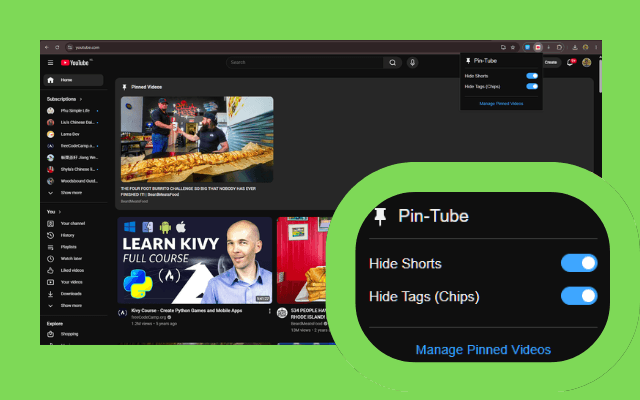
- Eradicate Distractions: It completely hides the Shorts feed, the Shorts sidebar links, and the keyword recommendation tags. Out of sight, out of mind.
- Native Video Pinning: It injects a custom "Pin" button directly into the YouTube video player.
- Smart Resume: Pinned videos are saved to a clean, native-looking shelf at the absolute top of your homepage. The extension remembers your exact timestamp, so you can resume watching with a single click.
(You can see the final product on my landing page here: xforbes.com/pin-tube)
Features in Action: The Before and After
1. Eliminating Distractions (Shorts & Tags)
One of the main reasons I built Pin-Tube was to remove parts of YouTube that added little value to how I actually use the platform.
The keyword tags on the homepage were something I rarely interacted with. If I wanted to watch something specific, I would simply search for it directly. The tags mostly occupied screen space without helping me discover content I genuinely cared about, so I added an option to hide them and keep the homepage cleaner.
Shorts were an even bigger distraction. They're specifically designed to maximize engagement and make it easy to keep scrolling from one video to the next. I found that opening a single Short often turned into several minutes of mindless scrolling before I even realized it. This isn't just anecdotal; studies on YouTube Shorts user engagement and content trends show how heavily algorithms push this format, while academic research highlights the cognitive impact of continuous short-video scrolling. Since my goal is to use YouTube intentionally rather than spend time on endless short-form content, I added a toggle to remove Shorts entirely.
After enabling these options, the homepage becomes much cleaner and more focused. Instead of competing for your attention with tags and an infinite Shorts feed, YouTube stays centered on the videos you actually came to watch.
2. Pin and Unpin Directly on the Video While watching any video, you'll see a native-looking "Pin" button right next to the usual player controls. Pinning a video saves it along with your exact timestamp.

3. The Pinned Video Row and "See All" On your homepage, your most recently pinned videos appear in a dedicated, distraction-free row at the very top. If you have pinned many videos, you can simply click the "See all" button.

4. Custom Pinned Videos Dashboard Clicking "See all" takes you to a custom dashboard page. Here, you can view all your saved videos, resume watching them exactly where you left off, and easily manage or control them.

The Architecture: Why Vanilla JS instead of React?
When starting a new web project today, the default instinct for most developers is to reach for React, Next.js, or Vue. But for a Chrome Extension, you have to think differently about performance.
I chose Vanilla JavaScript and CSS for Pin-Tube, and here is why:
- Zero Overhead: React requires loading an entire virtual DOM library into the user's browser on every single page load. When you are just injecting a single "Pin" button and a video row into an existing website, React is massive overkill.
- Direct DOM Manipulation: YouTube is a Single Page Application (SPA). To match their grid perfectly, I needed to use native
MutationObserversandResizeObserversto watch YouTube's CSS variables change in real-time. Vanilla JS interacts with the DOM instantly without fighting a framework's rendering cycle. - Bundle Size: My entire extension logic fits into a few kilobytes. It is lightning-fast, meaning it doesn't slow down the user's YouTube experience at all.
The "Smart Move" That Broke the Launch
Because I was using Vanilla JS, I wanted to modernize my build process. Instead of doing it manually, I used Vite and a popular Chrome Extension Vite plugin.
It felt like the right move. Vite automated my development reloads and minified the code. While testing locally on my machine, everything worked flawlessly. Feeling confident, I zipped up the dist/ folder, submitted version 1.2 to the Chrome Web Store, and excitedly tweeted the launch!
Then, the reality of production hit. As soon as the extension went live, three critical issues surfaced instantly:
1. The Fatal "Package is Invalid" Error Users trying to install the extension were greeted with a massive red error. The Vite plugin had renamed my JavaScript files with content hashes, but completely failed to bundle the CSS files correctly. Chrome rightfully refused to install a broken package.
2. The Scary "Read your browsing history" Warning
Users who did manage to test the build saw a massive privacy warning: "This extension can: Read your browsing history."
I had included the "tabs" permission in the manifest just to prevent the extension from opening duplicate dashboard tabs. However, Chrome maps the "tabs" permission directly to reading browsing history. It was a massive red flag for a simple productivity tool.
3. The Broken UI Toggles Even when the background script was working, opening the extension popup showed all toggles flipped to OFF. The Vite bundling process had broken the file references in the HTML, severing the connection to local storage.
The Fix: Deleting Vite (v1.3 Hotfix)
To fix these issues quickly, I realized I had brought a bazooka to a knife fight.
Step 1: The 50-Line Build Script I completely uninstalled Vite. Instead, I wrote a simple, native Node.js script to handle the build. It cleans the directory, copies files with their original names, and uses Terser to strip console logs and minify the JavaScript. The result was a 100% reliable build directory. No more invalid packages.
Step 2: Fixing the Privacy Warning
Instead of asking for full access to the user's browsing history just to check if a tab was open, I refactored the logic. By keeping track of the specific Tab ID in-memory inside the background service worker, we completely removed the "tabs" permission. The extension now only asks for basic local storage rights—removing the scary warning entirely.

What’s Next for Pin-Tube?
With version 1.3 out and running perfectly, I am already planning the next architectural updates:
- Import / Export Data: I want to give users the ability to easily export and import their pinned video data for sharing or simple backups.
- Simplifying the UI: I plan to declutter the interface even further by iconifying the sidebars and heavily reducing visual noise.

Final Thoughts & Shoutouts
Building Pin-Tube has been a massive learning experience in knowing when to use modern frameworks, and when to just trust the simplicity of Vanilla JavaScript.
Bringing a product to life requires so much more than just code. A huge thanks to Canva for making it incredibly simple and cool to design all the icons, promo banners, and store assets required for publishing. And a big shoutout to AI tools for dramatically speeding up my workflow and debugging process this weekend!
If you want to clean up your YouTube experience, go grab Pin-Tube on the Chrome Web Store and let me know what you think!